Backwards Design

Understanding by Design

by Ryan S. BowenPrint Version
Cite this guide:  Bowen, R. S.  (2017). Understanding by Design. Vanderbilt University Center for Teaching. Retrieved [todaysdate] from https://cft.vanderbilt.edu/understanding-by-design/.

Overview

Understanding by Design is a book written by Grant Wiggins and Jay McTighe that offers a framework for designing courses and content units called “Backward Design.” Instructors typically approach course design in a “forward design” manner, meaning they consider the learning activities (how to teach the content), develop assessments around their learning activities, then attempt to draw connections to the learning goals of the course. In contrast, the backward design approach has instructors consider the learning goals of the course first. These learning goals embody the knowledge and skills instructors want their students to have learned when they leave the course. Once the learning goals have been established, the second stage involves consideration of assessment. The backward design framework suggests that instructors should consider these overarching learning goals and how students will be assessed prior to consideration of how to teach the content. For this reason, backward design is considered a much more intentional approach to course design than traditional methods of design.

This teaching guide will explain the benefits of incorporating backward design. Then it will elaborate on the three stages that backward design encompasses. Finally, an overview of a backward design template is provided with links to blank template pages for convenience.

The Benefits of Using Backward Design

“Our lessons, units, and courses should be logically inferred from the results sought, not derived from the methods, books, and activities with which we are most comfortable. Curriculum should lay out the most effective ways of achieving specific results… in short, the best designs derive backward from the learnings sought.”

In Understanding by Design, Wiggins and McTighe argue that backward design is focused primarily on student learning and understanding. When teachers are designing lessons, units, or courses, they often focus on the activities and instruction rather than the outputs of the instruction. Therefore, it can be stated that teachers often focus more on teaching rather than learning. This perspective can lead to the misconception that learning is the activity when, in fact, learning is derived from a careful consideration of the meaning of the activity.

As previously stated, backward design is beneficial to instructors because it innately encourages intentionality during the design process. It continually encourages the instructor to establish the purpose of doing something before implementing it into the curriculum. Therefore, backward design is an effective way of providing guidance for instruction and designing lessons, units, and courses. Once the learning goals, or desired results, have been identified, instructors will have an easier time developing assessments and instruction around grounded learning outcomes.

The incorporation of backward design also lends itself to transparent and explicit instruction. If the teacher has explicitly defined the learning goals of the course, then they have a better idea of what they want the students to get out of learning activities. Furthermore, if done thoroughly, it eliminates the possibility of doing certain activities and tasks for the sake of doing them. Every task and piece of instruction has a purpose that fits in with the overarching goals and goals of the course.

As the quote below highlights, teaching is not just about engaging students in content. It is also about ensuring students have the resources necessary to understand. Student learning and understanding can be gauged more accurately through a backward design approach since it leverages what students will need to know and understand during the design process in order to progress.

“In teaching students for understanding, we must grasp the key idea that we are coaches of their ability to play the ‘game’ of performing with understanding, not tellers of our understanding to them on the sidelines.”

The Three Stages of Backward Design

“Deliberate and focused instructional design requires us as teachers and curriculum writers to make an important shift in our thinking about the nature of our job. The shift involves thinking a great deal, first, about the specific learnings sought, and the evidence of such learnings, before thinking about what we, as the teacher, will do or provide in teaching and learning activities.”
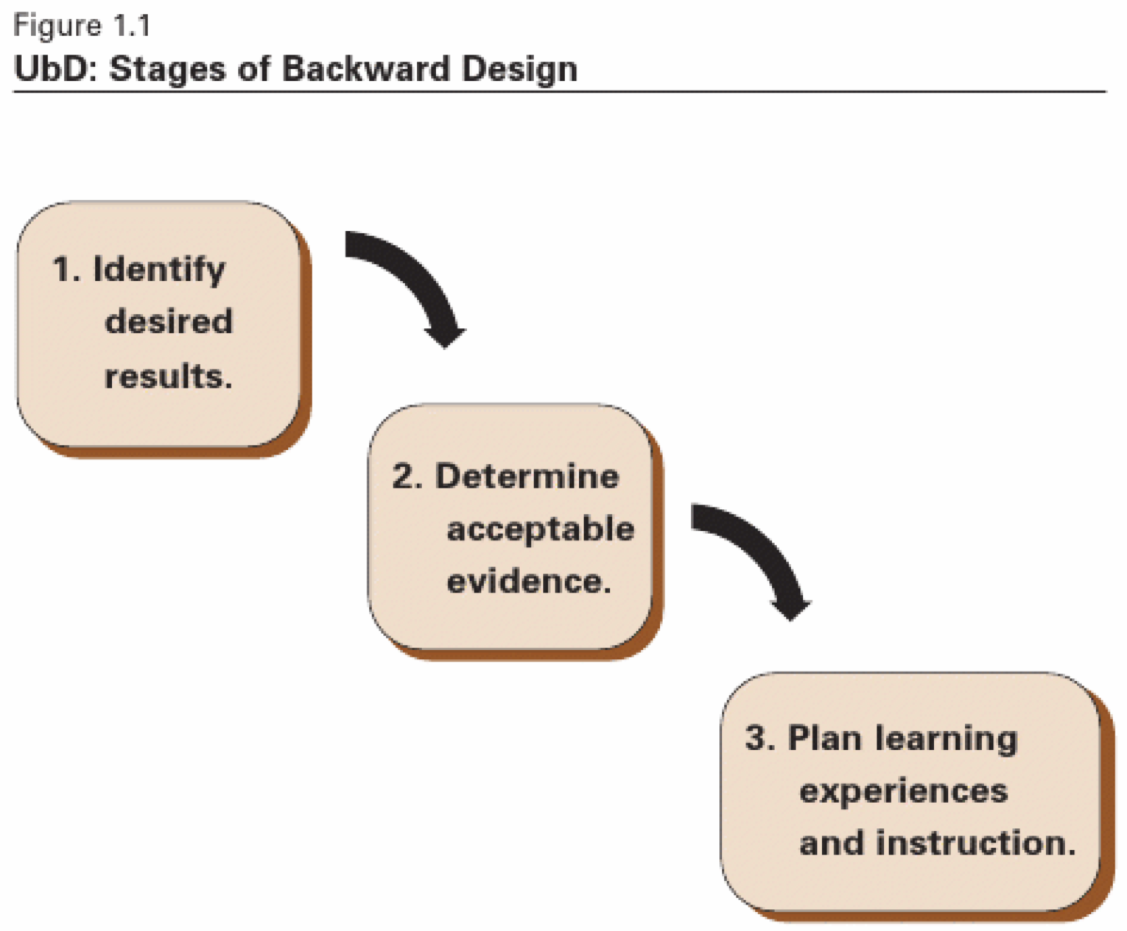
Stage One

Stage Two

Stage Three

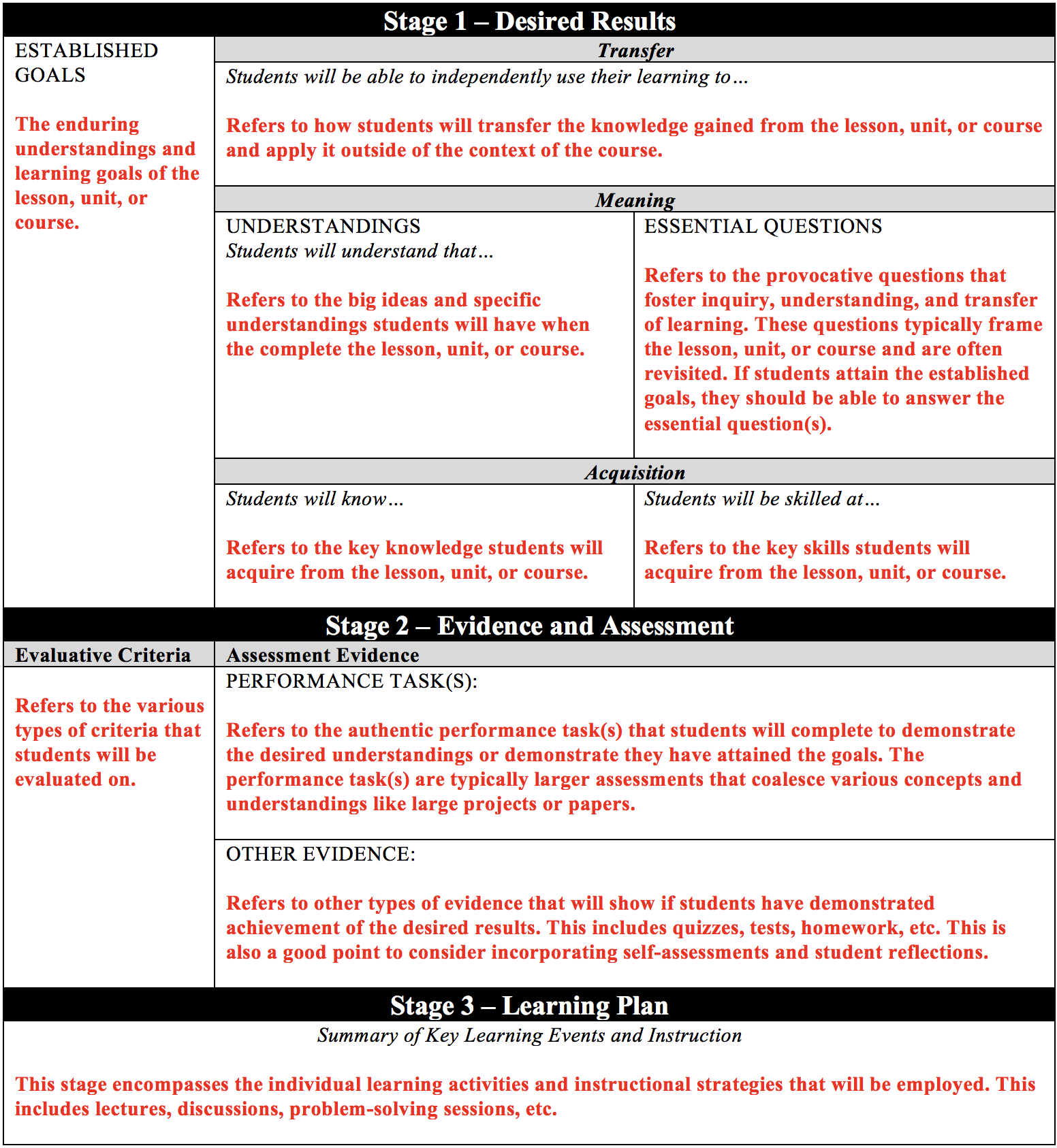
The Backward Design Template

A link to the blank backward design template is provided here (https://jaymctighe.com/resources/), and it is referred to as UbD Template 2.0. The older version (version 1.0) can also be downloaded at that site as well as other resources relevant to Understanding by Design. The template walks individuals through the stages of backward design. However, if you are need of the template with descriptions of each section, please see the table below. There is also a link to the document containing the template with descriptions provided below and can be downloaded for free.

Backward Design Template with Descriptions (click link for template with descriptions).
Edutopia -Making Videos

BLENDED LEARNING– Edutopia article

https://www.edutopia.org/article/5-step-guide-making-your-own-instructional-videos

A 5-Step Guide to Making Your Own Instructional Videos

Replacing your lectures with self-made videos can boost students’ engagement and free you up to work with them directly.By Kareem FarahRobert BarnettAugust 20, 2019

High school student completing an instructional video at her desk

©Edutopia

Imagine lecturing to a class in which some of your students are grade levels behind, some are grade levels ahead, some have special needs, and some are absent. It’s pretty hard to do that effectively, isn’t it?

As teachers in a Title I high school, we developed an instructional model built around self-made videos that empowered students at all levels to learn at their own pace and build mastery skill-by-skill. We used these screencast-style videos:

  • To replace traditional lecture-style direct instruction, freeing us up to work directly with individual students;
  • To give directions for projects and other complex tasks; and
  • To provide remediation on skills that students might need to practice.

Now, as founders of The Modern Classrooms Project, we train teachers to create blended learning classrooms of their own. The key is empowering educators to build their own high-quality instructional videos. Unlike externally created videos, these allow teachers to multiply themselves in the classroom without losing their authenticity—they can provide direct instruction via the videos while also circulating around the room, answering questions and guiding students to deeper learning.

STEP 1: CHUNK INSTRUCTION

Great teachers have a lot to say about their subjects. When it comes to video creation, however, time is of the essence. Research on instructional videosshows that learner engagement with videos begins to drop after the 6-minute mark—and it falls dramatically after 9. So it’s essential to chunk instruction such that each video covers a single learning objective or task, and nothing more. Multiple short videos are better than one long video.

For example, this video on inference by middle school English teacher Toni Rose Deanon introduces an important concept, provides several examples, and gives the students a task—all in just over 4 minutes. Her colleague Emily Culp’s video on four-box notes is equally concise, walking students through an example and teaching a note-taking strategy in 3:25. In a world of short attention spans, videos like these make their points clearly and quickly.

STEP 2: BUILD VIDEO-READY SLIDES

Studies also show that the best instructional videos are highly focused, use visual cues to highlight key information, and minimize the use of on-screen text. The slides that a teacher would use in a lecture may not work in a video—it’s critical to build a slide deck that is clear, simple, and visually compelling. (We have templates for math/science and English/history.)

In her video on the big bang theory, high school science teacher Moira Mazzi uses compelling visuals and clear annotations to explain a complex idea to her students. This keeps student attention on what Mazzi is saying and gives students an idea of the key terms and ideas they need to record in their notes.

STEP 3: RECORD

There are many tools you can use to create a strong instructional video. Here are a few that can really simplify the process and enhance the quality of the video.

Recording device: Ideally, you have a touch-screen tablet or laptop with a high-quality stylus. This ensures that you can easily annotate visuals and show work. Handwriting also adds a nice personal touch. But if you have a non-touch-screen laptop, or a tablet but no stylus, you can still make your own videos.

Screencasting program: The best programs, like Explain Everything, allow educators to pause and re-record specific segments of their video easily, which removes the pressure of getting a perfect take. Look for a program that has a robust video editor and an embedded annotation tool.

Microphone: This is often forgotten, but it’s really helpful to have a pair of headphones with an external mic—these headphones help you improve the sound quality and ensure that your videos don’t contain background noise.

In this video on digital sound production (note: video is in Spanish), music teacher Zach Diamond uses highlighting, annotating, and a computer screencast to show students how to create their own songs using a program called Soundtrap. The clarity of Diamond’s voice and the video helps students follow along, even with a complex task.

STEP 4: ENHANCE ENGAGEMENT

Simply sitting and watching videos can lead students to lose focus—the best instructional videos keep them actively engaged. Research shows that when students take notes or answer guided questions while watching, they retain material better than students who watch passively. Embedding questions in your instructional video using programs like Edpuzzle can improve student interaction and provide you with invaluable formative assessment data. Students should think of video-watching as a task they perform actively in order to learn.

In this video on the Pythagorean theorem, math teacher Michael Krell embeds frequent checks for understanding and provides feedback for students who get those checks wrong. Students are free to jump ahead to key points in the video to test their mastery of the material, if they so choose. Krell makes paper copies of the video slides for his students so that they can take notes as they watch.

STEP 5: BE YOURSELF

Perhaps the most important element of a strong video is authenticity. The most effective blended instruction isn’t pretty—it’s personal. Don’t be afraid to make mistakes, and make sure your authentic personality shines through. Research shows that videos in which the instructor speaks in a natural, conversational manner, with an enthusiastic tone, are the most engaging. In our experience, students really appreciate knowing that it’s their actual teacher behind the video.

In this video on states of matter, for instance, middle school science teacher Demi Lager lets her personality shine through. No matter how interested students may be in solids, liquids, and gases, her warm tone and sense of humor are likely to keep them engaged.

Learning to create a high-quality instructional video doesn’t happen overnight—it requires continual trial, error, and innovation. We’ve been recording videos for years, and we still often struggle to be compelling and concise. Yet we keep trying, because we believe that teacher-driven blended instruction is what’s best for our students. So start planning, grab some recording software, be yourself, and have fun!

Quality Questioning Activities

Quality Questioning

Quality Questioning- Walsh & Sattes  2nd Edition, 2017

Chapter 1- Setting the Stage:  What is Quality Questioning?

Chapter 2- Prepare the Question:  What are the Distinguishing Features of Quality Questions?

Chapter 3- Present the Question:   How Can Teachers Engage All Students in Thinking and Responding? 

Chapter 4- Prompt Student Thinking:   how Can Teachers Assist Students in Making Connections?

Chapter 5- Process Responses:  How Can Teachers Use Feedback to Deepen Student Thinking and Learning?

Chapter 6- Polish Questioning Practices:  How Can Practice Reflection and Dialogue About Classroom Questioning Improve Teaching and Learning. 

Explore QR Codes embedded In the book 

Alternate Response Structures 

Appendix

Affinity Mapping

Four Square Share

Ink Think

Interview Design

Save the Last Word for Me

Synetics

Table rounds

Embedded in chapters

Choral Response= Ch- 3

Data on Display- Ch- 3

Fishbowl- Ch- 3

Number Heads – Ch- 3

Peoplegraph- Ch- 3

Say-it-in-a word- Ch 3

See, Think, Wonder- Ch 5

Signaled Response- Ch 3

Think, Pair, Share -Ch 3 & 5

Work Samples- Ch 3

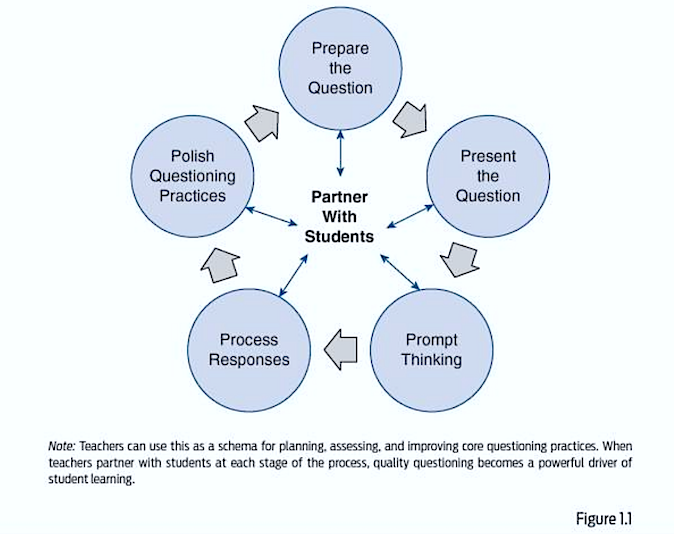
QUALITY QUESTIONING POINTS

The following is a list of important “nuggets of knowledge” from Quality Questioning:

► Most students don’t understand that when they don’t respond because they are not sure of the answer, they deprive the teacher of information he or she could use to help students learn. (p. 17)

► Teachers who believe questions are tools for actively engaging students in learning dedicate time and effort to formulating a limited number of focus-questions as part of their lesson planning. (p. 26)

► Checks for understanding are questions that gauge student progress toward identified learning goals, and typically engage students in thinking above the simple recall level. Using questions that check for understanding at critical junctures…helps a teacher determine whether to move forward or reteach. (p. 43)

► “No hand-raising except to ask a question, not to answer.” (p. 83)

► To use a particular structure (response structure) successfully, teach it to the students in advance, and let them practice so that they are familiar with the structure before they are asked to use it. (p. 104)

► “No Opt-Out” Policy. The choice between sticking with a student and requiring a response, or giving students a free pass, reflects our beliefs: Do we think all students, with appropriate assistance, can respond correctly? (p. 109-110)

► Life lessons students learn from a classroom that values questioning. (p. 111)

► Teacher prompts that help students understand the question. (p. 125)

► Question stems for students to use to build upon one another’s ideas. (p. 135)

Diagram

Description automatically generated

► Seven qualities associated with effective feedback: interactive, reciprocal, informative, understandable, timely, actionable, and capacity building. (p. 147-148)

► Four criteria for praise: contingency, specificity, credibility, and sincerity. (p. 162)

► Feedback of all types typically serves to close or terminate student’s answering. During a discussion where there is no single “right” answer, simple feedback can interfere with –and even shut down – student thinking. All types of feedback should be used sparingly and carefully. (p. 167)

JIGSAW TECHNIQUE

Instructional strategies

https://www.edutopia.org/blog/22-powerful-closure-activities-todd-finley

https://lead4ward.com/playlists/

Instructional Strategies Playlists – lead4wardinstructional strategies. Download All Strategies –> The lead4ward Instructional Strategies Playlists are designed to provide teachers with detailed descriptions of specific, instructional strategies, many of which are modeled and experienced in lead4ward professional development sessions.lead4ward.com

Quality Questioning

Walsh & Sattes on Questioning (2 Minutes)

The following is a list of important “nuggets of knowledge” from Quality Questioning:

► Most students don’t understand that when they don’t respond because they are not sure of the answer, they deprive the teacher of information he or she could use to help students learn. (p. 17)

► Teachers who believe questions are tools for actively engaging students in learning dedicate time and effort to formulating a limited number of focus-questions as part of their lesson planning. (p. 26)

► Checks for understanding are questions that gauge student progress toward identified learning goals, and typically engage students in thinking above the simple recall level. Using questions that check for understanding at critical junctures…helps a teacher determine whether to move forward or reteach. (p. 43)

► “No hand-raising except to ask a question, not to answer.” (p. 83)

► To use a particular structure (response structure) successfully, teach it to the students in advance, and let them practice so that they are familiar with the structure before they are asked to use it. (p. 104)

► “No Opt-Out” Policy. The choice between sticking with a student and requiring a response, or giving students a free pass, reflects our beliefs: Do we think all students, with appropriate assistance, can respond correctly? (p. 109-110)

► Life lessons students learn from a classroom that values questioning. (p. 111)

► Teacher prompts that help students understand the question. (p. 125)

► Question stems for students to use to build upon one another’s ideas. (p. 135)

► Seven qualities associated with effective feedback: interactive, reciprocal, informative, understandable, timely, actionable, and capacity building. (p. 147-148)

► Four criteria for praise: contingency, specificity, credibility, and sincerity. (p. 162)

► Feedback of all types typically serves to close or terminate student’s answering. During a discussion where there is no single “right” answer, simple feedback can interfere with –and even shut down – student thinking. All types of feedback should be used sparingly and carefully. (p. 167)

Walsh & Sattes- How to Ask a Quality Question ( 2 Minutes)

Personalize Questions (5 Minutes)

Open ended questions (<3 Minutes)

Engaging students the right way! (10 minutes)

Walsh Sattes Webinar on Quality Questioning ( 1 hour 10 minutes) –

5 Top Tips for Effective Questions

Quigly article on “Questioning-Top ten Strategies”-

Learn from Mistakes (2 minutes)

UBD (7 minutes)

PBL Support

Links to videos

Creativity expert Sir Ken Robinson challenged the way we educate our children, championing a radical rethink of how our school systems cultivate creativity and acknowledge multiple types of intelligence.

Why you should listen

Why don’t we get the best out of people? Sir Ken Robinson believed that it’s because we’ve been educated to become good workers, rather than creative thinkers. Students with restless minds and bodies — far from being cultivated for their energy and curiosity — are ignored or even stigmatized, with terrible consequences. “We are educating people out of their creativity,” Robinson said. It’s a message with deep resonance. Robinson’s first TED Talk has been distributed widely around the Web since its release in June 2006. The most popular words framing blog posts on his talk? “Everyone should watch this.”

A visionary cultural leader, Sir Ken led the British government’s 1998 advisory committee on creative and cultural education, a massive inquiry into the significance of creativity in the educational system and the economy, and was knighted in 2003 for his achievements. His 2009 book, The Element: How Finding Your Passion Changes Everything, is a New York Times bestseller and has been translated into 21 languages. A 10th-anniversary edition of his classic work on creativity and innovation, Out of Our Minds: Learning to be Creative, was published in 2011. His 2013 book, Finding Your Element: How to Discover Your Talents and Passions and Transform Your Life, is a practical guide that answers questions about finding your personal Element. And in Creative Schools: The Grassroots Revolution That’s Transforming Education, he reasoned for an end to our outmoded industrial educational system and proposed a highly personalized, organic approach that draws on today’s unprecedented technological and professional resources to engage all students.In this talk from RSA Animate, Sir Ken Robinson lays out the link between 3 troubling trends: rising drop-out rates, schools’ dwindling stake in the arts, and ADHD. An important, timely talk for parents and teachers… Still timely today!

Ken Robinson Video

PBL – rationale

“Understanding By Design” 
In this video Jay McTighe explains “Understanding By Design” ….

UBD in a nutshell

John Hattie, Visible Learning

Lev Vygotsky (1896-1934)
The zone of proximal development (ZPD) (zona blizhaishego razvitiia)  In contemporary education research and practice ZPD is often interpreted as the distance between what a learner can do without help, and what they can do with support from someone with more knowledge or expertise (“more knowledgeable other”). The concept was introduced, but not fully developed, by Russian psychologist Lev Vygotsky(1896–1934) during the last three years of his life. Vygotsky argued that a child gets involved in a dialogue with the “more knowledgeable other” such as a peer or an adult and gradually, through social interaction and sense-making, develops the ability to solve problems independently and do certain tasks without help. Following Vygotsky, some educators believe that the role of education is to give children experiences that are within their zones of proximal development, thereby encouraging and advancing their individual learning such as skills and strategies

Vygotsky
 defined scaffolding instruction as the “role of teachers and others in supporting the learners development and providing support structures to get to that next stage or levelBelow are four tips for using scaffolding in the classroom.

  • Know Each Student’s ZPD. In order to use ZPD and scaffolding techniques successfully, it’s critical to know your students’ current level of knowledge. … 
  • Encourage Group Work. … 
  • Don’t Offer Too Much Help. … 
  • Have Students Think Aloud.
  • High Tech High 

    INDIA- VEGA School

    ZPD- Why it matters!

    https://sites.google.com/site/qim501eiddmockingjay/discussion

    The zone of proximal development (ZPD), is the difference between what a learner can do without help and what he or she can do with help. It is a concept developed by Soviet psychologist and social constructivist Lev Vygotsky (1896 – 1934).

    Vygotsky stated that a child follows an adult’s example and gradually develops the ability to do certain tasks without help or assistance. Vygotsky’s often-quoted definition of zone of proximal development presents it as “the distance between the actual developmental level as determined by independent problem solving and the level of potential development as determined through problem solving under adult guidance, or in collaboration with more capable peers.”

    Vygotsky among other educational professionals believes the role of education to be to provide children with experiences which are in their ZPD, thereby encouraging and advancing their individual learning.

    John Hattie – Visible Learning

    We looked at John Hattie in an article recently, and I thought viewing a video where he talks openly about what “ingredients” lead to effective teaching would be helpful to us all.  


    As you watch these videos -in PLCs or on your own -jot down some questions that jump out at you. You can share these with me, and we can then use them to share out (anonymously) among ourselves to collaboratively make us all stronger as a school..

    John Hattie on Visible Learning and Feedback in the Classroom

    John Hattie: Visible Learning Pt1. Disasters and below average methods.

    John Hattie, Visible Learning. Pt 2: effective methods:

    Tony Wagner- 7 Skills to close the global achievement gap!

    “The Global Achievement Gap, Why Even Our Best Schools Don’t Teach the New Survival Skills Our Children Need — and What We Can Do About It” –Tony Wagner


    In a global economy that runs on innovation and curiosity, our schools still teach to standardized tests. 


    Wagner identified seven skills to meet the challenge of a global economy and begin to close the global achievement gap:

    • Critical thinking and problem solving — Teachers spend many hours on practice questions, test-taking strategies, and helping students memorize facts to prepare students to pass multiple-choice tests. In a workplace more complicated than ever, solutions to real life problems are not multiple-choice.

    • Leading By Influence — Students spend most of their school time learning in isolation. The world of work now requires employees to work in teams to accomplish company goals. Students must be prepared to present their ideas to others and advocate their position in developing a solution.

    • Agility and Adaptability — There is only one right answer in school. In the world of work, there is no perfect answer. Often, the answer is quickly invalidated by rapidly changing technology. 21st century employees need to be flexible, adaptable, and lifelong learners.

    • Initiative and Entrepreneurialism — The business model has changed. It is no longer a top-down institution with bosses in command. Employees are expected to bring skills to the workplace that allow them to figure out how to overcome obstacles. The teacher-as-boss model used in school teaches learners to focus on the assigned task but ill-prepared to think beyond the assigned task.

    • Effective Oral and Written Conversation — Most of the time in the classroom is direct instruction with the teacher talking and the students listening. Students need more focus on developing the written and verbal skills required to make clear and precise presentations.

    • Accessing and Analyzing Data — While students have limited data in the classroom: a textbook, lecture notes, and the web, the unlimited data from computers and smartphones make it essential for students to discern valid information from misinformation.

    • Curiosity and Imagination — The ability to ask good questions is the number one skill employers look for. 21st century employees must have the ability to think fast and develop imaginative solutions to problems in a rapidly changing world.

    Source:https://medium.com/@BabyMonsterToys/the-7-skills-needed-to-close-the-global-achievement-gap-why-american-students-are-falling-behind-ec5d135c5ec2

    Tony Wagnerhttps://www.tonywagner.com